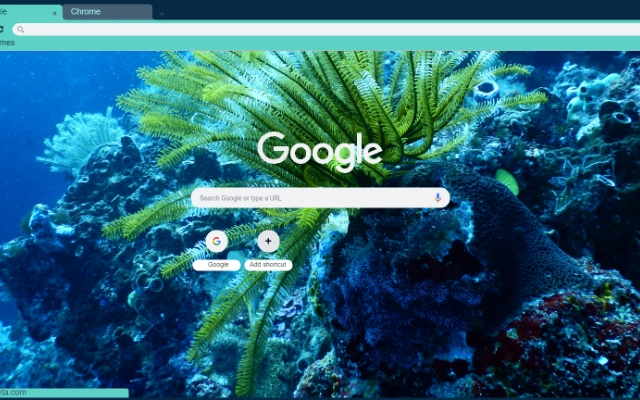

Coralreefs Chrome Backgrounds
Overview
The Coralreefs for your Chrome browser is a lightweight desktop application designed to transform the visual experience of Chrome users. Its primary purpose is to allow users to selectively change their browser’s background image to curated, high-quality Coralreefs-themed wallpapers. This software targets individuals who value aesthetics and personalization in their digital workspace, particularly those who use Chrome as their primary browser. The tool is ideal for creative professionals, digital art enthusiasts, and anyone seeking a refreshing visual environment while browsing.
By integrating seamlessly with Chrome, the software enables users to elevate their desktop interface without altering core browser functionality. Real-world usage scenarios include enhancing focus through calming natural visuals, personalizing workspaces for branding or mood, or simply enjoying high-resolution digital art during daily web sessions. The application focuses on visual appeal and ease of use, making it suitable for both casual users and those with a keen eye for design. The developer did not provide additional background details, but the product’s release date indicates it is a recent, purpose-built utility.
Key Features & Capabilities
- Curated Coralreefs Wallpapers – Access to a selection of high-quality, visually striking digital art featuring coral reef ecosystems. These images are optimized for browser backgrounds and offer vibrant, detailed visuals.
- One-Click Background Application – Users can apply a selected wallpaper with minimal effort, streamlining the customization process.
- Selective Wallpaper Management – The software allows users to choose specific images from the collection, enabling personalized background selection without forced updates.
- Lightweight Design – With a file size of 1.5 MB, the application is compact and does not impose significant storage or performance demands.
- Browser Integration – Designed specifically for Chrome, the tool ensures compatibility with the browser’s background rendering system.
These features support efficient customization, allowing users to refresh their browser interface quickly. For example, a designer might use the tool to set a coral reef background during creative sessions to inspire a sense of calm and natural beauty. A student could switch backgrounds daily to maintain visual interest during long study sessions. The software’s focus on quality and simplicity makes it effective for users seeking a quick yet meaningful visual upgrade.
User Interface, Workflow & Performance
The user interface of Coralreefs for your Chrome browser is designed with simplicity and efficiency in mind. The layout is minimal, focusing on image selection and application. Navigation is intuitive, with a clean display of available wallpapers and a single button to apply the chosen image. The workflow is streamlined: users browse the gallery, select a preferred image, and apply it with one click, minimizing friction in the customization process.
Performance is expected to be smooth due to the software’s lightweight nature and lack of complex background processes. The developer did not specify resource usage details, but given the 1.5 MB size and focus on a single function, it is likely to operate with minimal CPU and RAM impact. Stability is assumed to be consistent with standard desktop utilities of similar scope. The application does not appear to require constant background activity, reducing the risk of interference with other tasks.
Compatibility & System Requirements
Coralreefs for your Chrome browser is compatible with both Windows and Mac operating systems, making it accessible to a broad user base. The software version is 1.0, indicating a stable initial release. The installation size is 1.5 MB, which is small and suitable for devices with limited storage. The developer did not provide additional system requirements, so users should consider general compatibility standards for desktop applications on modern Windows and Mac systems.
Exact system requirements were not listed. Users are advised to ensure their Chrome browser is up to date and that their system meets baseline desktop application requirements. Compatibility with older operating systems or low-end hardware cannot be confirmed. Platform compatibility information is limited to the provided OS list, and no additional details about processor, memory, or graphics support were included.
Pros and Cons
Pros
- High-quality, visually appealing Coralreefs-themed wallpapers
- Simple, intuitive interface with minimal learning curve
- Lightweight at just 1.5 MB
- One-click application for quick customization
- Free to use with no hidden costs
Cons
- Limited to Chrome browser background customization
- No built-in wallpaper update or auto-change features
- Exact system requirements not specified
- Only available for Windows and Mac
- No advanced customization options beyond image selection
FAQ Section
Is Coralreefs for your Chrome browser compatible with all Chrome versions?
The software is designed for Chrome, but the developer did not specify exact browser compatibility. Users should ensure their Chrome browser is up to date for optimal performance.
Is the software safe to download and install?
As a desktop utility with a file size of 1.5 MB, the software is unlikely to contain malicious components. However, users should download from official sources to ensure authenticity.
Does the software require an internet connection to work?
The application functions primarily offline after installation. However, it may require an internet connection to access or download new wallpapers if such features are added in future updates.
Can I use this tool on multiple devices?
Yes, the software can be installed on multiple Windows and Mac devices, provided each device meets the basic system requirements.
Is there a license type or subscription required?
Yes, the software is free to use with no subscription or licensing fees. The developer did not specify a formal license type, but the free status indicates no ongoing cost.
Final Thoughts + CTA
Coralreefs for your Chrome browser delivers a focused, elegant solution for users seeking to enhance their browsing environment with high-quality digital art. Its lightweight design, intuitive interface, and immediate visual impact make it a standout choice for Chrome users who value aesthetics. While it offers limited functionality beyond background customization, its simplicity is its strength. The tool is ideal for individuals who want a quick, free way to refresh their desktop experience without complexity.
For those who appreciate visual harmony and digital creativity, this software offers a meaningful upgrade. It stands out as a dedicated utility with a clear purpose and strong execution. Download Coralreefs for your Chrome browser now.







